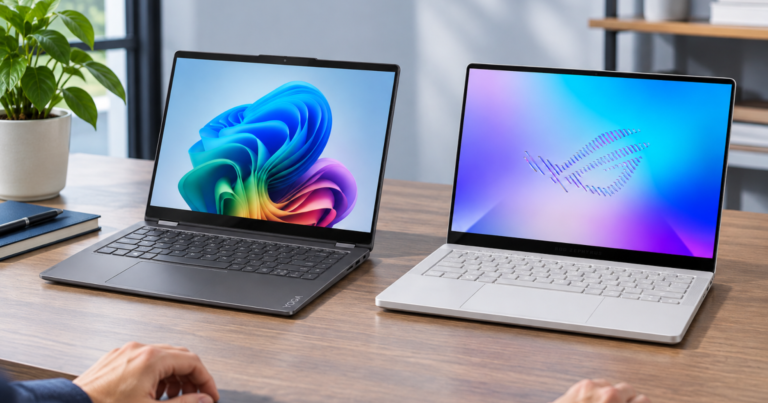
A 14-inch laptop can be a flexible note-taking machine, a portable workhorse, or a small gaming rig with serious hardware. Lenovo Yoga 7 14 vs ASUS ROG Zephyrus G14 is not a same-lane spec duel; it is a choice between a 360-degree convertible and a compact gaming laptop. Both are current official US models, both sit in the carry-friendly 14-inch class, and both require you to choose memory carefully because neither offers memory expansion after purchase.
Quick Buying Links
Lenovo Yoga 7 14
portable productivity, touch input, built-in HDMI and microSD, and lighter OLED configurations
ASUS ROG Zephyrus G14
Better for buyers who need compact gaming-class hardware, discrete NVIDIA graphics, Thunderbolt 4, and a 3K OLED display
What to know first
The Lenovo Yoga 7 2-in-1 Gen 10 (14 inch AMD) is the better fit when the laptop has to bend around your day: typing, reading, presenting, annotating, and using touch in laptop, tent, stand, or tablet modes. The ASUS ROG Zephyrus G14 (2026) GU405 is the better fit when the reason for buying a 14-inch machine is gaming-class hardware in a smaller chassis.
That difference drives almost every other trade-off. Lenovo gives you a convertible design, touch display options, HDMI 2.1, a microSD card reader, and a lower stated starting weight in OLED form. ASUS gives you an Intel Core Ultra 9 Processor 386H, NVIDIA GeForce RTX 5070 Ti Laptop GPU with 12GB GDDR7, a 3K OLED 120Hz Pantone Validated display, Thunderbolt 4, Wi-Fi 7, and a 250W AC adapter listed on its official specification page.
Before narrowing the choice, it helps to map the machine to your actual week rather than to a fantasy version of your workload. The One-Week Laptop Brief is useful for turning your apps, locations, peripherals, and bag habits into clearer requirements.
The two laptops in plain English
Lenovo Yoga 7 14: the flexible productivity pick
The Lenovo Yoga 7 2-in-1 Gen 10 (14 inch AMD) is officially listed as a Yoga 7 2-in-1 Gen 10 14-inch AMD model, with AMD Ryzen AI 5 340 or Ryzen AI 7 350 processor options. Its graphics are integrated AMD Radeon 840M or Radeon 860M, so the machine’s center of gravity is everyday productivity and flexible use, not dedicated gaming hardware.
The 360-degree hinge is the headline ownership difference. Lenovo lists laptop, tent, stand, and tablet modes, which matters for readers who spend part of the day typing and part of the day reading, marking up documents, watching lectures, presenting across a small table, or working with touch input. The Yoga also has 14-inch touch display options: WUXGA IPS 60Hz, WUXGA OLED 60Hz, or a 2.8K OLED 120Hz maximum option.
For a closer fit-focused profile, the site’s Lenovo Yoga 7 14 page is the natural next stop after this comparison.
ASUS ROG Zephyrus G14: the compact performance pick
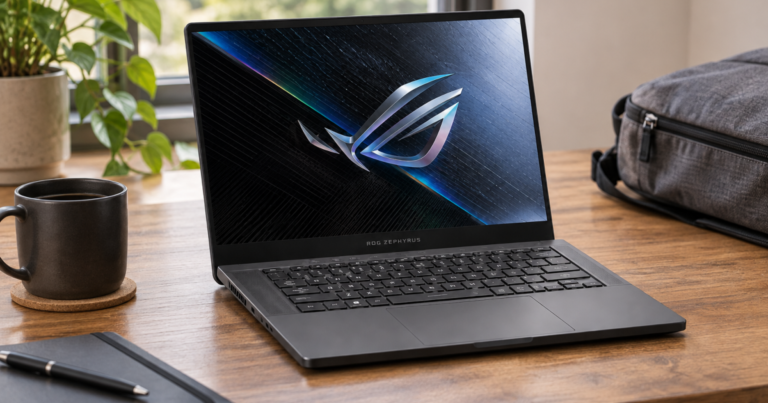
The ASUS ROG Zephyrus G14 (2026) GU405 is listed by ASUS under ROG gaming laptops. Its official specification page names an Intel Core Ultra 9 Processor 386H with 16 cores and 16 threads, plus an Intel NPU up to 50 TOPS. The larger practical divide, though, is graphics: ASUS lists an NVIDIA GeForce RTX 5070 Ti Laptop GPU with 12GB GDDR7.
That makes the Zephyrus the clear choice between these two when dedicated NVIDIA laptop graphics are central to the purchase. It also carries a 14-inch 3K 2880 x 1800 OLED display with a 16:10 aspect ratio, 120Hz refresh rate, and Pantone validation. ASUS also lists Wi-Fi 7 and Bluetooth 6.0, which are not shared criteria in the Lenovo evidence pack, but are part of the verified ASUS specification.
For more context on this laptop family’s fit and trade-offs, read the ASUS ROG Zephyrus G14 review.
Side-by-side differences that change daily use
- Category: Lenovo is a 14-inch 2-in-1 laptop with a 360-degree hinge. ASUS is a 14-inch gaming laptop from the ROG line.
- Processor platform: Lenovo uses AMD Ryzen AI 5 340 or Ryzen AI 7 350 options. ASUS lists an Intel Core Ultra 9 Processor 386H.
- Graphics: Lenovo uses integrated AMD Radeon 840M or 860M graphics. ASUS uses an NVIDIA GeForce RTX 5070 Ti Laptop GPU with 12GB GDDR7.
- Display: Lenovo offers 14-inch touch display options, including WUXGA IPS 60Hz, WUXGA OLED 60Hz, and 2.8K OLED 120Hz max. ASUS lists a 14-inch 3K OLED 120Hz Pantone Validated display.
- Memory: Lenovo offers 16GB, 24GB, or 32GB soldered memory with no memory slots. ASUS offers 16GB or 32GB onboard LPDDR5X-8533 with no expansion possible.
- Storage: Lenovo lists 512GB or 1TB M.2 2242 PCIe 4.0 x4 SSD offerings, one slot, and up to 1TB support. ASUS lists a 1TB PCIe 4.0 NVMe M.2 SSD and one M.2 PCIe slot.
- Battery capacity: Lenovo lists a 70Wh rechargeable Li-ion battery with Rapid Charge Express. ASUS lists a 73Wh 4-cell Li-ion battery.
- Weight: Lenovo starts at 3.04 lb for OLED models or 3.31 lb for IPS models. ASUS is listed at 3.48 lb.
Portability is close, but not identical
Both laptops are compact on paper because both are 14-inch machines. The difference is what each one asks you to carry around that 14-inch footprint. Lenovo’s official starting weight is lower in OLED form at 3.04 lb, while the ASUS is listed at 3.48 lb. That gap is not dramatic, but it is real in a bag that already carries a charger, headphones, notebook, and maybe a second device.
The charger story also points to the category split. Lenovo lists a 70Wh battery and a 65W USB-C adapter option in the evidence pack. ASUS lists a 73Wh battery and a 250W AC adapter. Battery capacity alone does not settle runtime, because display choice, graphics workload, settings, and the kind of task matter. But the adapter ratings tell you something about intent: the Yoga is built around mainstream portable computing, while the Zephyrus is feeding more demanding hardware.
Ports: Lenovo is friendlier for simple plug-in days
Lenovo’s port list is unusually practical for a slim 14-inch 2-in-1: one USB-A, two USB-C, HDMI 2.1, a 3.5mm audio jack, and a microSD card reader. That combination is friendly for classrooms, meeting rooms, home desks, and lightweight creator workflows where an HDMI cable or memory card still shows up at exactly the wrong moment.
ASUS lists two USB 3.2 Gen 2 Type-A ports, one USB 3.2 Gen 2 Type-C with DisplayPort, power delivery, and G-SYNC, one Thunderbolt 4 with DisplayPort and power delivery, plus a 3.5mm combo audio jack. It is the stronger spec sheet for a modern high-bandwidth USB-C setup, especially because Thunderbolt 4 is listed. Lenovo, however, has the broader no-dongle convenience for HDMI and microSD. Dongle life is not a tragedy, but it is an excellent way to lose a tiny adapter at the worst possible time.
Memory and storage: choose the configuration with future-you in mind
Neither laptop gives you memory expansion after purchase. Lenovo’s official specification lists 16GB, 24GB, or 32GB soldered memory with no memory slots. ASUS lists 16GB or 32GB onboard LPDDR5X-8533 with no expansion possible. That makes memory the most important configuration decision for longevity. If your normal workload involves lots of browser tabs, large files, creative tools, or keeping communication apps open all day, the higher-memory configurations deserve more attention than a small cosmetic upgrade.
Storage is less symmetrical but still constrained by the official slot information. Lenovo lists 512GB or 1TB offerings, one M.2 2242 PCIe 4.0 x4 SSD slot, and support up to 1TB. ASUS lists a 1TB PCIe 4.0 NVMe M.2 SSD with one M.2 PCIe slot. For readers who keep large local game libraries, media projects, or offline files, the ASUS starting point is cleaner because the verified specification lists 1TB. For lighter document, browser, and cloud-heavy work, Lenovo’s 512GB or 1TB offerings make the decision more about budget and file habits.
Display choice: touch flexibility versus one premium gaming-class panel
Lenovo gives you a menu of touch display choices. That matters because the right Yoga configuration depends on how you use the convertible design. A WUXGA IPS 60Hz model keeps the concept simpler. A WUXGA OLED 60Hz option shifts the experience toward richer panel technology. A 2.8K OLED 120Hz maximum option lines up better with buyers who want the Yoga’s flexibility without giving up a sharper, smoother display class.
ASUS is more direct in the verified listing: a 14-inch 3K 2880 x 1800 OLED, 16:10, 120Hz, Pantone Validated display. There is no convertible touch story in the evidence pack; the Zephyrus display is part of a compact gaming laptop package. Choose it because you want that 3K OLED 120Hz panel paired with discrete NVIDIA graphics, not because you want tablet-style flexibility.
The practical recommendation
Choose the Lenovo Yoga 7 14 when your laptop has to adapt to your body, desk, bag, and meeting style. It is the better match for students and professionals who want a 14-inch Windows convertible for typing, touch, reading, presenting, and everyday multitasking. Its practical advantages are the 360-degree hinge, touch display choices, HDMI 2.1, microSD card reader, and lower stated starting weight in OLED form. The compromise is clear: integrated AMD Radeon graphics are not in the same gaming hardware class as the ASUS discrete NVIDIA GPU.
Choose the ASUS ROG Zephyrus G14 when compact gaming-class hardware is the point of the purchase. Its verified strengths are the Intel Core Ultra 9 Processor 386H, NVIDIA GeForce RTX 5070 Ti Laptop GPU with 12GB GDDR7, 3K OLED 120Hz Pantone Validated display, Thunderbolt 4, Wi-Fi 7, and a 73Wh battery. The compromise is that it is heavier than the Yoga’s listed OLED starting weight, uses a 250W AC adapter, and does not offer the Yoga’s 360-degree convertible modes.
The cleanest decision is this: buy the Yoga for flexible productivity and low-friction everyday carrying; buy the Zephyrus for a 14-inch machine where dedicated gaming hardware justifies the extra weight and power profile. Both demand an upfront memory decision, so 32GB deserves attention for heavier multitasking on either side. The wrong choice here is not a bad laptop. It is a good laptop aimed at the wrong week.
Quick Buying Links
Lenovo Yoga 7 14
portable productivity, touch input, built-in HDMI and microSD, and lighter OLED configurations
ASUS ROG Zephyrus G14
Better for buyers who need compact gaming-class hardware, discrete NVIDIA graphics, Thunderbolt 4, and a 3K OLED display